

Starting a job in the UAE means dealing with MOHRE contracts, codes and online portals. Many employees see MB, ST, and a transaction number on their MOHRE labour contract but are not sure what they mean or how to use them.
This guide explains your MOHRE labour contract, the MB and ST codes, transaction numbers, how to find your labour contract number, and how to check or download a UAE labour contract sample online.
MB, ST and Transaction Number in MOHRE
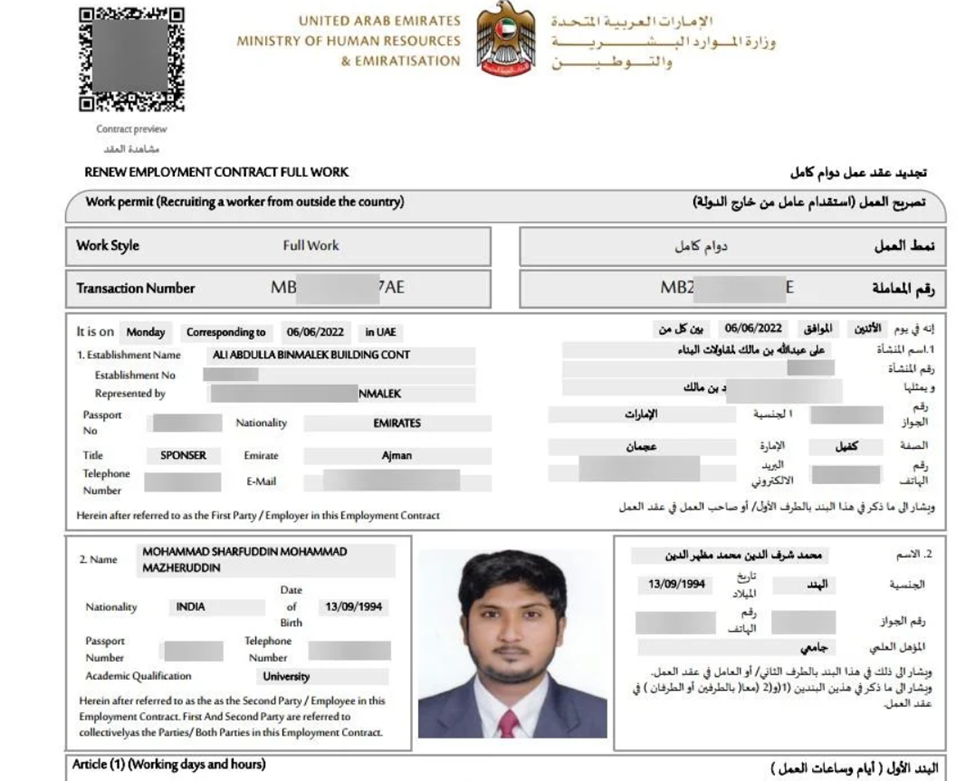
On a MOHRE labour contract, ST stands for Standard Terms (non‑negotiable terms required by UAE labour law), and MB stands for Mutual Benefit (extra clauses and benefits agreed between employer and employee). The transaction number is the unique reference MOHRE uses to track your work permit/contract application, and it is needed to view or print your contract online.
What Is a MOHRE Labour Contract?
A MOHRE labour contract is the official work agreement registered with the UAE Ministry of Human Resources and Emiratisation (MOHRE). Once signed and approved, it legally binds both employer and employee to the terms of employment.
Key elements typically include description
- Salary and allowance and overtime rules
- Leave entitlements
- Termination and notice conditions
After you sign your contract, the employer must submit it to MOHRE within 14 days of your arrival in the UAE, and you must receive your contract within 60 days or the employer may face a fine.
What is MB in MOHRE?
In a UAE labour contract, MB means Mutual Benefit.
These are additional clauses and benefits agreed beyond the basic law, such as extra acknowledgements. Custom terms that both employer and employee accept, provided they do not violate UAE labour law.
Think of MB as the “extra” part of your contract that goes above the mandatory minimum.
What Is ST in MOHRE?
ST stands for Standard Terms. Standard Terms are the non‑negotiable core conditions required under UAE labour law.Items like basic protection minimum legal requirements.
These ST clauses must comply with UAE Labour Law and apply to all regular contracts under MOHRE.
What Is the Difference Between MB and ST in a Labour Contract?
The difference between MB and ST in labour contract can be summarised simply:
| Feature | ST (Standard Terms) | MB (Mutual Benefit) |
| Purpose | Sets the minimum employment terms required by UAE labour law. | Includes additional benefits or clauses agreed between the employer and employee. |
| Legal Requirement | Mandatory and applies to all eligible employment contracts. | Optional and based on mutual agreement between both parties. |
| Negotiability | Generally not negotiable, as these are statutory requirements. | Can be negotiated, provided they do not reduce the employee’s legal rights. |
| Employee Rights | Establishes the legal baseline of employee protections and entitlements. | Offers benefits that go beyond the minimum legal requirements. |
| What It Means in Your Contract | Shows the rights and conditions guaranteed by law. | Shows the additional terms and benefits your employer has agreed to provide. |
When you read your contract, ST sections show what the law guarantees; MB sections show what your specific employer adds on top.
What are the Different Types of Labour Contracts in the UAE?
Mentioned below are the different types of labour contracts in the UAE:
| Type of Contract | Description |
| Fixed-Term Contract | Fixed-term, specifies start and end dates, up to 3 years, renewable. |
| Unlimited Contract | No expiration date, ends by mutual consent, can be terminated with 30 days’ notice. |
| Full-time Contract | Up to 48 hours per week, extra hours must be compensated. |
| Part-time Contract | Less than 48 hours per week, can work for multiple employers with MoHRE approval. |
| Temporary Contract | Probation periods last 90 days, renewable at the employer’s discretion. |
| Special Employment Contract | For high-level positions, it lasts 2 years, is renewable, and includes specific benefits. |
| Job-sharing Contract | Allows part-time employees to share tasks and working hours. |
What Is the Transaction Number in MOHRE?
The transaction number in MOHRE is a unique reference ID created when your work permit or labour contract transaction is processed in the MOHRE system.
You use this transaction number to:
- Search for your contract under “View Approved Contract” on the MOHRE website
- Print your electronic work permit or contract under “Print Electronic Work Permit”
In practice, you will usually see this number in:
- MOHRE SMS or email notifications about your work permit or contract
- The online forms when you search for or print your contract
- In some cases, on top of the electronic contract or work permit document
MOHRE Labour Contract Number: How to Find It
People often refer to the MOHRE labour contract number as the main reference shown on your electronic contract or work permit.
To locate it:
- Download or open your contract from the MOHRE website or app.
- On the contract or electronic work permit, look at the top section for fields such as work permit No or person code / contract ID
- These references are used when you:
- Use “Print Electronic Work Permit”, where you must enter the work permit number and transaction number
- Enquire about your contract with MOHRE or your employer
So, when someone asks for your “MOHRE labour contract number”, they are usually referring to the work permit or contract reference displayed in your downloaded document.
UAE Labour Contract Sample (MOHRE Contract Structure)
While MOHRE does not publish an editable template as a public MOHRE contract sample, the structure of a UAE labour contract sample typically includes:
- Employee details: name, nationality, passport/Emirates ID
- Employer details: company name, trade licence, address
- Job details: title, description, workplace location
- Salary breakdown: basic salary, allowances, total salary
- Working hours and weekly rest days
- Leave entitlements (annual, sick, other)
- Probation and contract duration (for fixed‑term contracts)
- Termination rules and notice periods
- ST (Standard Terms) section
- MB (Mutual Benefit) section, if applicable
You can see a “live” version of this structure by viewing or downloading your own approved labour contract via MOHRE.
How to Check Your MOHRE Labour Contract Online
There are several ways to view your MOHRE labour contract online.
Method 1 – MOHRE Website (View Approved Contract)
- Go to the MOHRE website.
- Open the “Services” dropdown.
- Select “View Approved Contract”.
- Choose the search method:
- By transaction number, or
- By Emirates ID (EIDA) number
- Enter the required details and click “View my contract”.
- Your contract details will appear on the ‑screen.
If you do not have your labour card number, you can also search using passport number plus transaction number, nationality and date of birth under the same service.
Method 2 – MOHRE App
- Download the official MOHRE app (Android/iOS).
- Create an account or sign in using UAE Pass.
- Open the Dashboard.
- Scroll to and tap “Contract”.
- Your labour contract details will be displayed; you can also take a screenshot for reference.
Method 3 – Print Electronic Work Permit
For a printable version:
- Go to the MOHRE website.
- Navigate to Services → New Enquiry Services.
- Select “Print Electronic Work Permit”.
- Enter the transaction number, work permit number, person code and date of birth.
- Complete the captcha and search.
- Click Print to download or print your contract.
When you sign a labour contract, the Ministry of Human Resources and Emiratisation (MOHRE) will issue you a labour card. This card allows you to work for your current employer and is proof of your work permit. You may need to show this card to authorities if they ask to verify your work status at your workplace.
The labour card contains basic information such as the employer’s name, the type of work, and your details.
On the other hand, the labour contract is a document that outlines all the legal obligations of both the employee and the employer. The labour contract is the main document, and the labour card is a supporting document.
Frequently Asked Questions
What is MB in MOHRE on my labour contract?
What does ST mean in a MOHRE labour contract?
How do I find my transaction number in MOHRE?
Can I download a MOHRE labour contract sample?
Is the MOHRE labour contract the same as my offer letter?
Conclusion
Understanding your MOHRE labour contract, the meaning of MB and ST, and how to use your transaction number helps you stay in control of your rights and obligations in the UAE. With MOHRE’s website and app, you can easily view, download and print your UAE labour contract whenever you need it.
As you manage important work documents and legal responsibilities, it is also wise to protect your income, health and family against unexpected events. Call Instant Alfred to understand your options, expert advisors at InsuranceMarket.ae help you compare quotes in minutes and find the most economical insurance and protection solutions for your life in the UAE.